ARY Plus
3.198.00Reviews
Analysis ByAppCompare
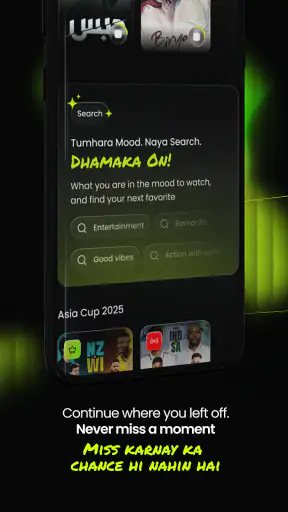
I found ARY Plus most useful when I treated it as a shared entertainment app rather than as a complete replacement for every streaming service in the house. It brings dramas, live sports, exclusive programming, and short-form Snips into one place, which makes it appealing when different people want different kinds of viewing. I could move from a longer episode to a quick clip without changing apps, and that simple change of pace is the main reason I can imagine keeping it installed.
The app is free, belongs to the entertainment category, and comes from ARY SERVICES LTD. It has reached more than five million installs, so it is clearly aimed at a broad audience rather than a small specialist group. Its average rating sits at about 3.1, which tells me to approach it with realistic expectations: the content mix can be attractive, but the experience is not universally smooth for everyone.
How ARY Plus fits into a shared household
A practical evening with several viewers
In a household, the strongest use case is the moment when nobody agrees on one thing to watch. One person may want a drama, another may be following a live sports event, while someone else only has a few minutes for short entertainment. ARY Plus gives those choices a common starting point. Instead of passing one phone around or opening several unrelated services, each viewer can look for the type of content that suits the moment.
I would use it this way during a busy evening: start with a short Snip while preparing food, switch to a live match when everyone is ready, and return to a drama later when there is time to settle down. That workflow is more useful than simply saying the app has “varied content,” because the different formats serve different parts of the day. Short clips work for gaps; longer programs work when the household can watch together; live sports create a reason to open the app at a particular moment.
There is also a social advantage. When one person discovers a drama or sports stream, it is easier to suggest it to others when they already use the same app. That does not guarantee that everyone will like the same catalog, but it reduces the friction of explaining where to find something. For a household that already follows ARY programming, this shared starting point may matter more than having the largest possible library.
Where the shared-device idea becomes less convenient
The same setup can become awkward when several people expect completely separate viewing habits. I would not assume that one installation automatically creates a clean personal space for every member of a household. Account behavior, viewing continuity, and recommendations should be checked directly during setup rather than treated as family features. If everyone uses one device, the practical solution may simply be taking turns, but that is less comfortable when viewers want to watch at the same time.
This is especially important on a television or tablet left in a common room. A younger viewer might open the app after an adult has been watching sports or drama content, and the next person may see whatever was left open. That is not a criticism of the catalog itself; it is a reminder that shared hardware needs ordinary household coordination. I would close the current program and return to a neutral screen before handing the device to someone else.
Compared with a general video platform, ARY Plus feels more focused. A broad service may offer more unrelated channels and a more mature multi-user system, while this app is more appealing when its particular dramas, sports coverage, exclusives, and Snips are what the household actually wants. The trade-off is straightforward: focused relevance can be better than endless choice, but only if the available programming matches your interests.
Setting expectations before everyone starts watching
Because the app is free, it is easy to install as a trial without making a major commitment. I like that approach here. Rather than deciding from the description alone, I would open it on the device most often used by the family, test the search and playback flow, and then see whether the content fits the household’s routine. A free app still costs time and attention, so the trial should answer practical questions: Can everyone find what they want? Does live viewing fit the connection and device? Are short clips genuinely useful, or do they just add another distraction?
The current version is 3.7.8, and the app supports devices running Android 7.0 or later. That makes it accessible on many older Android devices, though compatibility on a particular phone or tablet is still worth checking before planning a shared setup. A household with an older spare phone may find this helpful, while someone expecting the newest interface on every screen should keep expectations measured.
I would also decide in advance which device is the “main” viewing screen. Using a phone for quick Snips and a larger screen for dramas or sports creates a clearer routine. It prevents the app from becoming a tug-of-war over one tablet and helps each person understand when the device is available. This is a small organizational choice, but it makes a free entertainment app feel much less chaotic.
Account boundaries and everyday coordination
Shared entertainment works best when people agree on simple boundaries. I would avoid assuming that everyone should use the same account or that personal viewing behavior will remain separate automatically. If the app presents account options during setup, each adult can decide whether a personal sign-in makes sense; if the household uses one shared arrangement, viewers should understand that activity may be visible to the next person using the device.
Another useful habit is coordinating live sports before the event begins. Live viewing is less forgiving than an on-demand episode: arriving late, changing devices, or handing the phone to someone else can interrupt the group experience. I would open the app early, confirm that the intended stream is easy to locate, and keep the device charged. These are ordinary steps, but they matter more for live content than for a short clip that can be watched whenever convenient.
For dramas, coordination is different. A household can agree not to continue an episode without the person who started it, especially when a shared device makes it tempting to press play. If the app does not provide the separation a family expects, a simple message or household rule can prevent spoilers. I see this as one of the app’s practical trade-offs: its value comes from bringing people together, but shared use requires more communication than truly individual profiles would.
Snips deserve their own place in that routine. They are convenient when someone has only a few minutes, but they can also turn a planned viewing session into endless scrolling. I would use them as a deliberate break rather than as the default way to browse. A useful trick is to decide whether you are opening the app for a specific drama, a live event, or quick clips before launching it. That small intention makes the catalog easier to manage.
Age context and trust in a family setting
ARY Plus carries a Teen content rating, so I would not treat it as an automatically suitable children’s app. That does not mean every item is inappropriate for every younger viewer, but it does mean adults should pay attention to what is being selected. In a shared household, the rating is a starting point for supervision, not a substitute for knowing the individual programs.
For teenagers, the app may be a reasonable way to follow dramas, sports, and entertainment in a familiar environment, especially when an adult already knows the content style they enjoy. For younger children, I would choose programs with them and avoid leaving the app open as an unattended source of recommendations. The important distinction is between a teen-rated entertainment service and a dedicated children’s platform designed around younger audiences.
I also would not promise that one household arrangement will satisfy every age group. Adults may appreciate live sports and exclusive programming, teenagers may prefer dramas or Snips, and younger viewers may need direct guidance. The app can support those different interests, but the family still has to make the decisions about timing, content, and device sharing.
Trust matters in another way: viewers should know who is responsible for the account and the device. If a teenager is allowed to use the app independently, I would explain the household’s expectations about watching live events, sharing the device, and stopping playback when another person needs it. If an adult is using a child’s tablet, I would leave the device in a predictable state afterward. Clear habits are more reliable than assuming the app will organize the family for you.
What it does better than usual alternatives
The clearest advantage is concentration. Instead of opening one service for dramas, another source for sports, and a separate place for short clips, ARY Plus puts those formats under one roof. That is particularly useful for viewers who already seek ARY-related entertainment and do not want to maintain several apps for closely connected viewing habits.
It can also be more approachable than a huge general streaming catalog. A giant service often makes the viewer spend time browsing before finding something familiar. Here, the narrower identity may help someone decide quickly, especially when the goal is a particular type of regional entertainment rather than random discovery.
On the other hand, a broad alternative may be better for households with strongly different tastes. If one person wants international films, another wants children’s programming, and a third wants documentaries, a more general service may provide a wider shared library. ARY Plus makes more sense when its specific mix is central to the household, not when it is expected to cover every viewing need.
It is also worth separating free access from convenience. A paid service may offer a more polished experience, stronger household separation, or a catalog that better matches a particular family. ARY Plus wins on the low barrier to trying it, but I would judge it by how often the household actually uses its content rather than by the fact that no payment is required.
Small habits that make the app easier to use
My first tip is to give each content type a job. Use live sports for scheduled group viewing, dramas for planned sessions, and Snips for short breaks. This prevents the app’s variety from feeling like clutter and helps each viewer open it with a clear purpose.
My second tip is to test it on the device that will carry the most responsibility. A phone that works for a quick clip may not be the best shared screen for a long drama or a live event. I would check readability, sound, battery behavior, and how easily another person can take over before making that device the household default.
My third tip is to create a handoff routine. Before passing the device on, stop playback, lower the volume if needed, and tell the next viewer what was being watched. This is particularly helpful when the same account or screen is shared, because it reduces accidental spoilers and avoids the assumption that the next person wants to continue the previous program.
My fourth tip is to treat the rating as part of the selection process. When a teenager and an adult share a device, choosing together is simple and respectful. When a young child is involved, I would not rely on the app being open in the background. The Teen rating makes active supervision the sensible default for younger members of the household.
Who should install it, and who should skip it
I would recommend trying ARY Plus if you regularly watch ARY dramas, follow live sports, or enjoy switching between full programs and short clips. It is especially suitable for a household that wants one free entertainment app with several viewing modes and is comfortable coordinating use on shared devices.
I would be more cautious if your main priority is a perfectly separated family setup. Anyone who expects every viewer to have a distinct, carefully organized space should investigate the account experience before making it the household’s only service. Likewise, viewers who mainly want a broad international catalog may find a general streaming platform more satisfying.
The rating of about 3.1 from roughly twenty-four thousand ratings reinforces my balanced view. Many people have clearly found a reason to use it, yet the score is not a signal that every device, connection, or household routine will feel effortless. I would install it because the price is free and the content combination is distinctive, but I would keep another option available if live viewing or shared access becomes frustrating.
My household verdict
After looking at how the app works as a shared entertainment choice, I see its best quality in its focused mix rather than in any promise of doing everything. It gives dramas, live sports, exclusives, and Snips a common home, which can simplify a family’s viewing routine when those are the formats people already want.
The limitations are equally practical. A shared device needs clear handoffs, a shared account needs sensible boundaries, and the Teen rating means adults should remain involved when younger viewers are present. Those are not reasons to reject the app, but they are reasons to use it deliberately instead of assuming that installation alone will organize the household.
My recommendation is to try ARY Plus as a focused, free addition to the home rather than as the only entertainment service. If its dramas, sports, and short clips match your household’s interests, it can earn a regular place on a phone or shared screen. If your family needs broad content coverage, strong personal separation, or child-centered viewing, a different service may be the better primary choice. For the right household, though, its combination of formats makes it a practical app to keep available when everyone wants something different.
FAQ
What is ARY Plus, and what can I watch on it?
ARY Plus is a streaming platform focused on Pakistani entertainment and television content. After exploring the app, users can typically find dramas, entertainment shows, news-related programming, live channels, and selected on-demand videos associated with ARY Network. The exact catalog may change over time, and availability can depend on your country, licensing agreements, and whether a program is currently being broadcast or archived.
Is ARY Plus free to download and use?
The ARY Plus app is generally free to download, but access to every feature or program may depend on the service’s current policies. Some content can be available without payment, while certain streams, premium programs, or regional features may require registration, a subscription, or another form of access. Before watching regularly, check the in-app information and the official store listing for current pricing and conditions.
Can I watch ARY Plus live TV and on-demand videos?
ARY Plus is designed to provide both live and on-demand viewing, although the available options can vary by channel, program, and location. Live streams are useful for following current broadcasts, while on-demand sections let you watch selected episodes or clips at a convenient time. During testing, users should expect that some content may be delayed, unavailable, or restricted outside supported regions.
Does ARY Plus work on Android and iPhone devices?
ARY Plus is intended for mobile viewing on supported Android and iOS devices, making it convenient to watch programs at home or while traveling. Performance depends on your phone or tablet model, operating-system version, available storage, and internet connection. If the application does not appear in your local app store, the service may not officially support your region or device.
What internet connection is recommended for watching ARY Plus?
A stable internet connection is important for a smooth ARY Plus experience, especially when watching live television or high-quality video. Wi-Fi is usually the best choice for longer viewing sessions because mobile streaming can consume substantial data. If playback pauses, lowering the video quality, closing other bandwidth-heavy apps, restarting the connection, or updating the application may help resolve common streaming problems.
Pros
- Live access to ARY Digital and selected Pakistani TV channels.
- Large library of Pakistani dramas
- shows
- news
- and entertainment.
- Supports on-demand viewing for catching up on missed episodes.
- Simple interface makes browsing popular content relatively easy.
- Useful for viewers abroad seeking Pakistani-language programming.
Cons
- Some content may be unavailable because of regional licensing restrictions.
- Video quality can vary depending on the program and internet connection.
- The app may include frequent advertisements during free streaming.
- A stable
- fast connection is recommended for smooth HD playback.
- Some features or content may require a paid subscription.